View
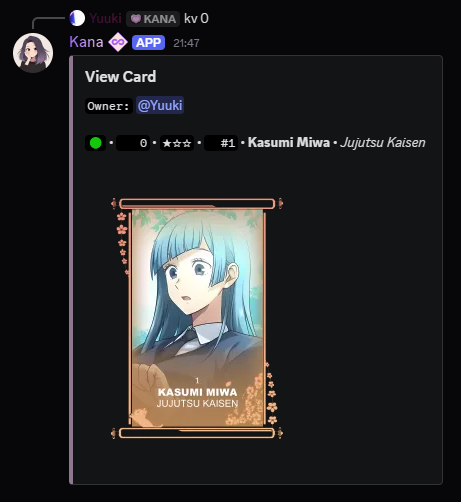
Cards can be viewed using the [p]view <card code> [v] command, or for more detailed information, the [p]cardinfo [ci] command.
Each card has several properties that define its uniqueness and rarity. A card is typically represented as follows:
🟢 • 0 • ★☆☆ • 1 • Kamisato Ayaka • Genshin Impact
Card Properties
A card contains several attributes that define its uniqueness, rarity, and history.
🟢- Mastery Rank - Indicates progression [🟢->🟡->🟠->🔴->🟣]0- Card Code - A unique identifier★☆☆- Tier - Rarity-based, affects customization options (0-3 stars, shown as filled stars out of three)1- Print - The card's print number in its era (L-stands for Legacy; see Legacy Prints).- Character Name - (e.g., Kamisato Ayaka)
- Series Name (e.g., Genshin Impact)
Additional data may be viewed by using the [p]cardinfo [ci] command:
- Edition - The card's version number and the artist who illustrated it
- Alias - The card's custom alias, if one is set
- Frame - The frame applied to the card, if any
- Shades - The shades applied to the card's slots, showing each shade's name and resonance
- Drop & Grab History - Who dropped it, who grabbed it, who currently owns it, and which server and when it was grabbed
Press Trace character under the card to see every copy of that character and who owns them. See Trace.
Usage
- Command:
[p]view - Alias: [
v] - Description: Displays a large image of the specified card.
- Parameters:
- (Optional)
[card code]- The card's unique identifier. - If no card code is provided, it defaults to the user's last acquired non-sacrificed card.
- (Optional)
Usage
- Command:
[p]cardinfo - Alias: [
ci,owner] - Description: Shows a smaller image but provides more detailed information.
- Parameters:
- (Optional)
[card code]- The card's unique identifier. - If no card code is provided, it defaults to the user's last acquired non-sacrificed card.
- (Optional)
note
These commands only work for non-sacrificed cards.