Trading
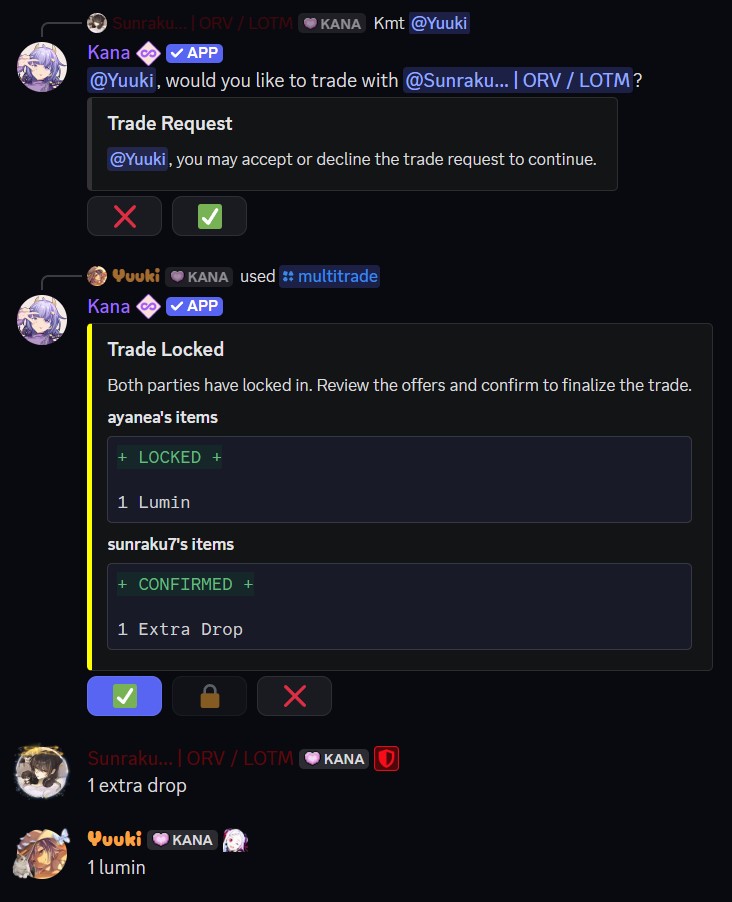
Trading lets two players exchange cards and other belongings safely, with both sides having to agree before anything changes hands. Start a trade with the [p]multitrade [mt] command.
- Command:
[p]multitrade <@user> - Alias: [
mt] - Parameters:
<@user>- The user you want to trade with, by mention or user ID.
What You Can Trade
A single trade can include a mix of:
- Cards
- Gold
- Items (such as materials and consumables)
- Frames
- Shades
Adding to Your Offer
Type what you want to offer into the trade channel. Separate multiple entries with commas; capitalisation does not matter.
| To offer | Type | Example |
|---|---|---|
| Cards | The card code | abc12 |
| Gold | An amount followed by gold | 100 gold |
| Items | An amount followed by the item name | 5 rubies |
| Frames | An amount, the frame name, then frame | 2 sakura frames |
| Shades | The shade code, starting with $ | $ab12 |
For example, abc12, 100 gold, 2 sakura frames adds a card, 100 Gold, and two frames in one message. Typing the same thing again replaces its amount.
How a Trade Works
- Request - Run
[p]multitradeand mention the person you want to trade with. They receive a request to accept or decline. - Build your offer - Once accepted, a trade window opens. Each player adds what they want to offer by typing it into the channel. Your side of the window updates as you add things.
- Lock - When you are happy with your offer, press Lock to freeze your side. Both players must lock in.
- Confirm - After both sides are locked, press Confirm. Once both players confirm, the trade executes and the items swap owners.
At any point before the final confirmation, either player can decline to cancel the whole trade.
You can only be in one trade at a time, and both players must be registered, verified, and free of trade restrictions. Trade requests expire if they are not accepted in time, and an open trade is cancelled after 5 minutes without any activity.
Trading is the safest way to exchange items with another player, since nothing moves until both sides confirm. If you just want to hand a card to someone with no exchange, use [p]give instead.