Card Collection
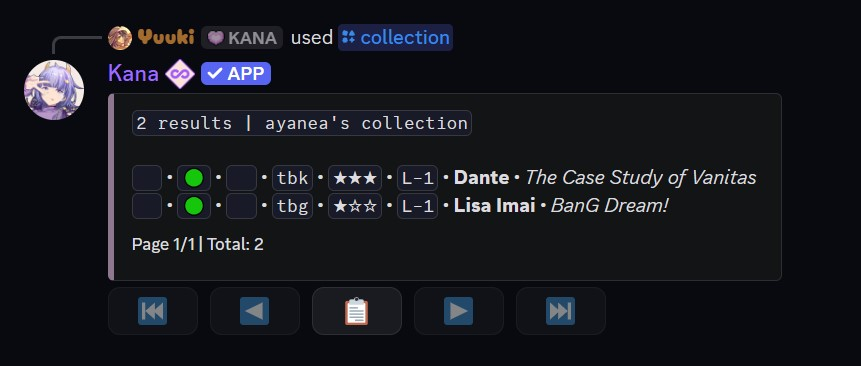
The [p]collection [c] command allows users to view their collection of cards, including various filters to customize the display.
Collections can be paginated, this provides easy navigation. Additionally, built-in sorting options can be accessed through the select menu for easy of use.
Usage
- Command:
[p]collection [user] - Alias: [
c] - Parameters:
- (Optional)
[user]- View another user's collection by mentioning them or using their user ID.
- (Optional)
note
Only registered, unrestricted users with no privacy settings enabled for this command can have their collection viewed.
Filters
- Sorting & Ordering:
- Syntax:
<filter>:<criteria> - Filters:
oororder- Sorting order. Prefix with-to reverse it (e.g.-o:wl).
- Criteria:
wl- Order by wishlist (highest first).p- Order by print (ascending).v- Order by version (ascending).ti- Order by tier (highest first).
- Example:
o:wl- Sorts the collection by wishlist count, most wishlisted first.-o:wlshows the least wishlisted first.
- Syntax:
- Value Filters:
- Syntax:
<filter>(<, >, =, <=, >=)<number> - Filters:
wlorwishlist- Wishlist count.porprint- Print count.tiortier- Tier [0-3].vorversion- Card version, as shown in[p]cardinfo.
- Example:
wl>5- Filters cards with a wishlist count greater than 5.version:1- Filters cards on version 1.
- Syntax:
- Tag Filters:
- Syntax:
<filter>:<tag> - Filters:
tortag- Filter by card tag name.ntornotag- Whether a card is untagged (true) or tagged (false).
- Special value:
t:untagged- Filter by cards without any tag.
- Example:
t:character- Filters cards with the "character" tag.
- Syntax:
- Series Filters:
- Syntax:
<filter>:<series> - Filters:
sorseries- Filter by series name.
- Example:
s:Mythical Creatures- Filters cards from the "Mythical Creatures" series.
- Syntax:
- Shade & Glow Filters:
- Syntax:
<filter>:<true/false> - Filters:
shade- Whether the card has any shade applied.gorglow- Whether the card has a glowing shade.
- Options:
trueort- Has one.falseorf- Does not.
- Example:
shade:true- Filters cards that have a shade applied.
- Syntax:
- Character Filters:
- Syntax:
<filter>:<name> - Filters:
c,char,character,nameorn- Filter by character name.
- Example:
c:Ayaka- Filters cards of characters matching "Ayaka".
- Syntax:
- Matching Text:
- Character and series filters match part of a name, so
c:gojo,c=gojo, andc is gojoall find "Satoru Gojo". Matching ignores capitalisation. - Use
!:,!=,is not, or a leading-to exclude names (c is not gojo,-s:naruto).
- Character and series filters match part of a name, so
- Print Type Filters:
- Syntax:
<filter>:<true/false> - Filters:
legacyorl- Legacy prints.rngorr- RNG prints.3d- 3D cards.
- Example:
legacy:true- Filters cards with a Legacy print.
- Syntax:
- Frame Filters:
- Syntax:
<filter>:<true/false> - Filters:
f,frameorframed- Filter based on whether a card is framed.
- Options:
trueort- Has frame.falseorf- No frame.
- Example:
f:true- Filters cards with a frame.
- Syntax:
- Sacrificed filter:
- Syntax:
<filter>:<true/false> - Filters:
sacorsacrificed- Filter by whether a character has been sacrificed.
- Example:
sac:false- Filters cards of characters that have not been sacrificed.
- Syntax:
note
Cards that have been sacrificed are displayed with an empty space in the third slot or the 🌀 emoji.
tip
Combining Filters:
- Syntax:
<filter1> <filter2> - Filters can be combined to refine searches further.
- Example:
nt:true wl<10- Returns cards that haven't been tagged and have a wishlist lower than 10