Shades
Shades are unique color tints and glowing effects that you can apply to your card frames. Every shade is randomly generated, so no two are exactly alike. Each one has its own Shade ID (which always starts with $), a generated name, and a set of properties that determine how rare and how striking it is.
Rolling Shades
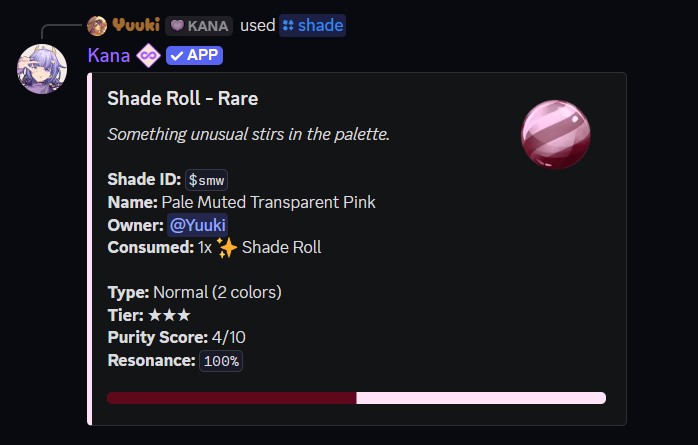
Roll a new shade with the [p]shade [sh] command. Each roll consumes one Shade Roll token, which you can buy from the item shop for 10 Ashes.
- Command:
[p]shade - Alias: [
sh] - Parameters: None
- Description: Consumes one Shade Roll and generates a new random shade that is added to your collection.
Every rolled shade shows the following properties:
- Shade ID - The unique identifier, always starting with
$. - Name - An automatically generated color name.
- Type - Either Normal or Cartoon.
- Colors - How many colors make up the shade.
- Tier - The overall rarity, shown as stars (see below).
- Purity Score - A value from
1to10. - Glow Score - Only present on the rare shades that roll with a Glow modifier, from
1to10. - Resonance - Starts at
100%. Every application uses some up.
Shade Tiers
| Tier | Stars | How it is reached |
|---|---|---|
| Common | ★☆☆☆☆ | A standard Normal shade. |
| Uncommon | ★★☆☆☆ | Reserved for future use. |
| Rare | ★★★☆☆ | A Cartoon shade, or a Normal shade with purity. |
| Epic | ★★★★☆ | Purity score 7 or higher, or any single-color (mono) shade. |
| Radiant | ★★★★★ | High purity and mono, or a Cartoon mono shade. |
| Transcendent | ★★★★★✦ | A perfect purity score of 10. |
Glow is a rare modifier with roughly a 5% chance on any roll. A glowing shade adds a colored halo around the frame and displays a separate Glow Score.
Applying Shades
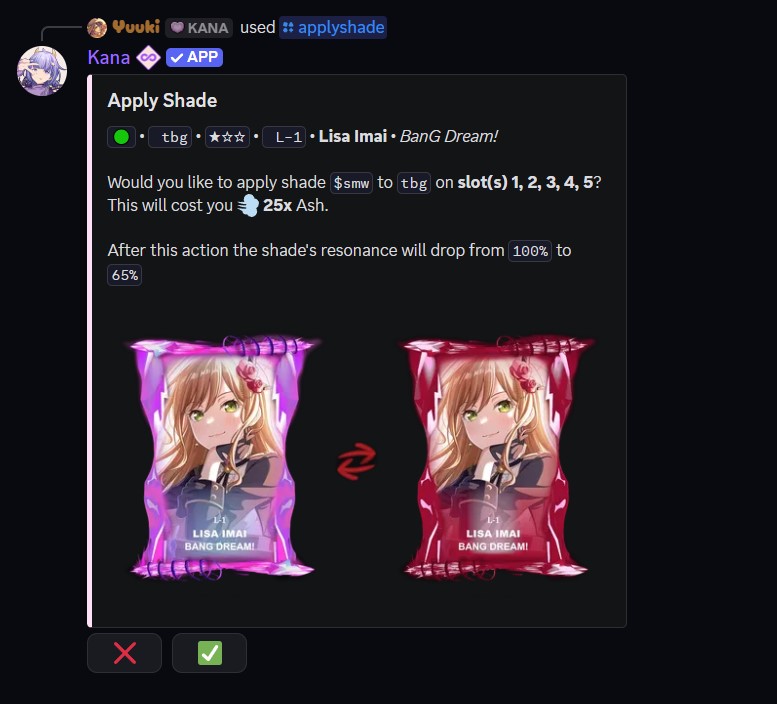
Apply a shade to a card's frame slots with the [p]applyshade [as] command. Each slot you shade costs 5 Ashes.
- Command:
[p]applyshade <shade_id> <card_id> [slots] - Alias: [
as] - Parameters:
<shade_id>- The shade to apply, including the$(for example$a1b2).<card_id>- The card to apply it to.- (Optional)
[slots]- One or more slot numbers from1to5, separated by spaces or commas (for example1,2). Defaults to slot1.
The number of slots a card has depends on its frame. See the Frames page for the slot index of each frame.
You can only apply shades to cards and shades that you own. Applying the exact same shade to a slot it is already on has no effect.
Resonance
Every shade has resonance, which starts at 100%. Applying a shade to a slot uses up some resonance, and higher tiers use up more per slot. When a shade runs out of resonance, it cannot be applied again until it is repaired.
For example, a Common shade uses 4% resonance per slot, while a Transcendent shade uses 33% per slot. Applying to multiple slots at once multiplies the cost, so Kana warns you if an application would deplete the shade.
Repairing Resonance
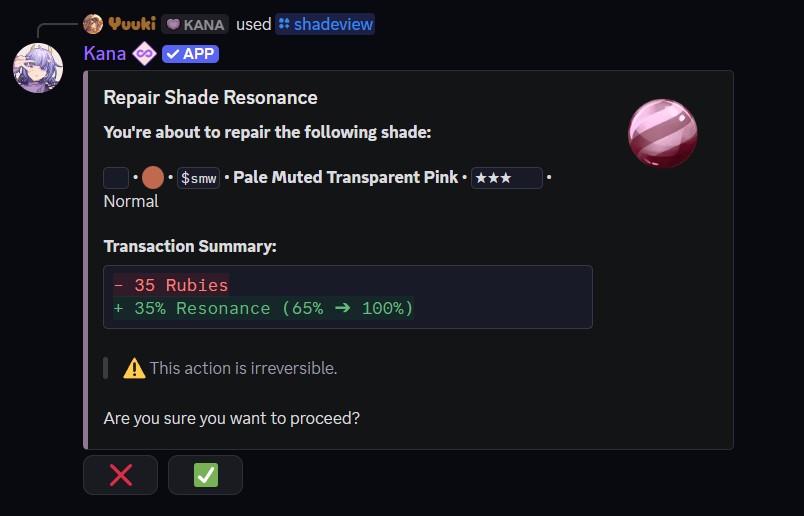
To restore a shade back to full resonance, view it with [p]shadeview and press the Repair button (it only appears if you own the shade and it is below 100%). Repairs are paid for in Rubies, scaled to how much resonance is missing.
Viewing Shades
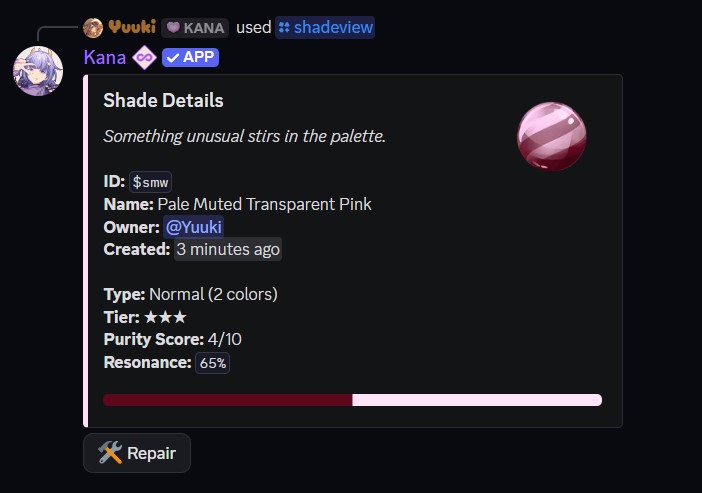
Use [p]shadeview [sv] to inspect a single shade or to see which shades are on a card.
- Command:
[p]shadeview <shade_id | card_id> - Alias: [
sv] - Parameters:
<shade_id | card_id>- A shade ID starting with$shows that shade's full details and swatch. A card code instead lists every shade slot on that card.
To browse your whole shade collection, use [p]shadecollection [sc]. See Shade Collection for its filters, sorting options, and website link.
Removing Shades
Take a shade back off a card with [p]removeshade [rs]. The shade is freed up so you can reuse it or burn it again.
- Command:
[p]removeshade [card_id] [slots] - Alias: [
rs] - Parameters:
- (Optional)
[card_id]- The shaded card to remove from. Defaults to your most recently acquired shaded card. - (Optional)
[slots]- Slot numbers, comma lists, ranges, orall. Defaults to all shaded slots.
- (Optional)
Burning Shades
If you no longer want a shade, burn it with [p]shadeburn [sb] to reclaim some resources. Burning is permanent.
- Command:
[p]shadeburn <shade_id> - Alias: [
sb] - Parameters:
<shade_id>- The shade to burn, including the$.
- Description: Permanently destroys the shade in exchange for Ashes based on its tier.
Higher tiers burn for far more. A Common shade returns 1 Ash, while a Transcendent shade returns 30 Ashes.
To burn many shades in one go, use [p]batchshadeburn [bsb, batchburn]. Pass a list of shade IDs (up to 50 at once) or t:<tag> to burn everything under one of your shade tags. Locked shades are skipped.
Only registered, unrestricted users for this command can interact with this system.