Frames
Frames are the decorative borders you can apply to any card. On their own they change a card's look, and they also provide the slots that hold shades, so a fancier frame gives you more room to customize.
Getting Frames
Every card starts with a default frame (Blossom Scroll, or Nexor for legacy prints). To get decorative frames, buy them from the Frame Shop with [p]frameshop [fs]. Many frames are community-made, and each has its own price. Frames you own are stored in your inventory.
Applying a Frame
Apply a frame to a card with the [p]applyframe [af] command.
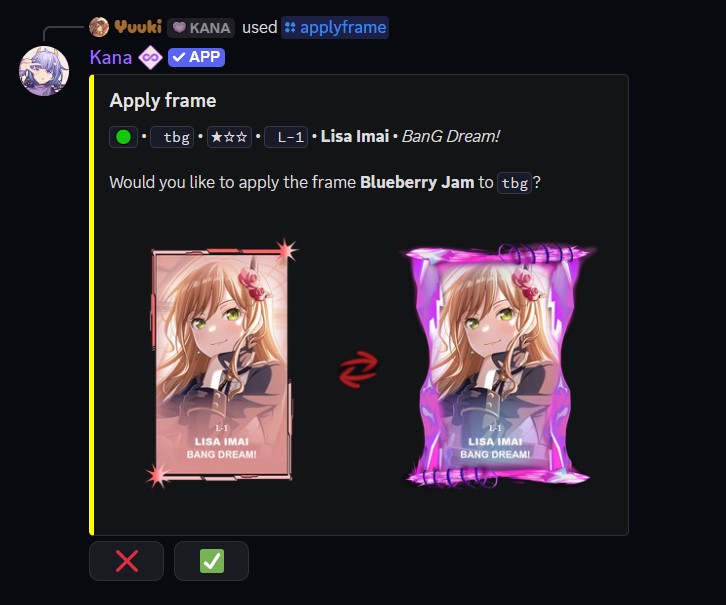
- Command:
[p]applyframe <card code> <frame name> - Alias: [
af] - Parameters:
<card code>- The card to apply the frame to.<frame name>- The name of the frame to apply. You can leave off the word "frame" in the name.
Removing a Frame
Remove the frame from a card with the [p]removeframe [rf] command. This costs 5 Lumin, the card returns to its default frame, and the removed frame is returned to your inventory.
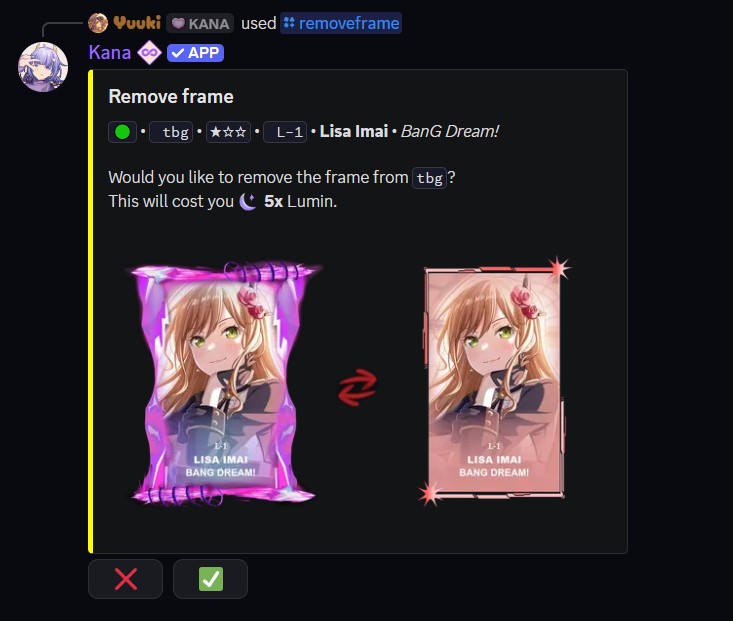
- Command:
[p]removeframe [card code] - Alias: [
rf] - Parameters:
- (Optional)
[card code]- The card to remove the frame from. If omitted, defaults to your most recently acquired card.
- (Optional)
Frame Slots
Each frame has a number of slots that shades can be applied to. When applying shades with [p]applyshade [as], use the following slot indices:
Blossom Scroll
| Index | Display Name | Description |
|---|---|---|
| 1 | Gradient Base | Main frame gradient |
| 2 | Flower Details | Floral ornament accents |
| 3 | Cat Details | Cat figure decorations |
| 4 | Side Ornaments | Left/right side details |
| 5 | Top & Bottom Plates | Upper and lower frame sections |
Celestial
| Index | Display Name | Description |
|---|---|---|
| 1 | Gradient Base | Main frame gradient |
| 2 | Side Ornaments | Left/right side details |
| 3 | Top & Bottom Plates | Upper and lower sections |
| 4 | Left Extras | Additional left-side details |
| 5 | Right Extras | Additional right-side details |
Inferno Blaze
| Index | Display Name | Description |
|---|---|---|
| 1 | Gradient Base | Main frame gradient |
| 2 | Side Ornaments | Left/right side details |
| 3 | Top & Bottom Plates | Upper and lower sections |
| 4 | Star Details | Star-shaped decorations |
Blueberry Jam
| Index | Display Name | Description |
|---|---|---|
| 1 | Gradient Base | Main frame gradient |
| 2 | Left Side | Left panel details |
| 3 | Right Side | Right panel details |
| 4 | Top Plate | Upper section |
| 5 | Bottom Plate | Lower section |
Use [p]shadecollection [sc] to view your available shades and their codes, then apply one with [p]applyshade <shade_id> <card code> [slots]. See the Shades page for the full workflow.
Default Frames
Every card is assigned one of these default frames automatically until you apply a decorative one:
| Print type | Default frame |
|---|---|
| Standard cards | Blossom Scroll |
| Legacy prints | Nexor |
Only registered, unrestricted users for this command can interact with this system.