Launch Crossover 2026
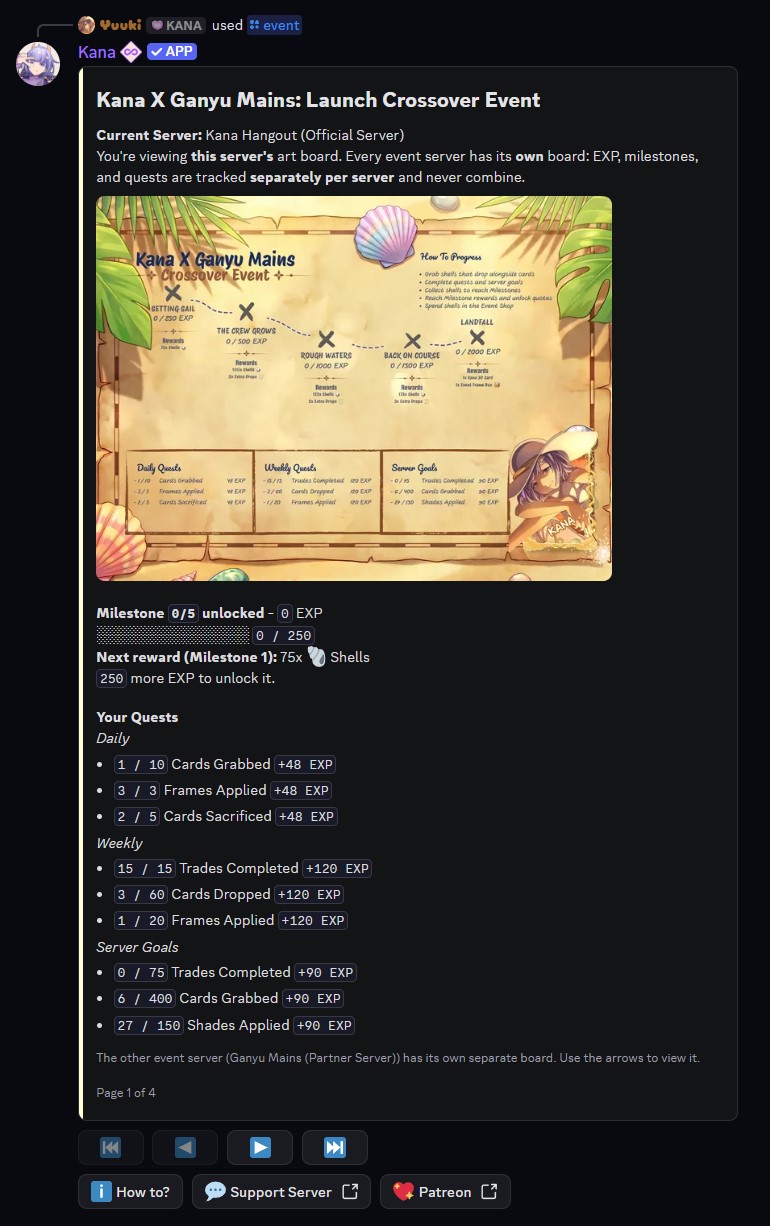
The Kana X Ganyu Mains Launch Crossover is a limited-time event celebrating the collaboration between the two communities. Play the bot as you normally would to earn event EXP, unlock milestone rewards, and stock up on event-exclusive currency and items. Check your progress at any time with the [p]event command.
The Launch Crossover runs from 22 August 2026, 12:00 UTC to 19 September 2026, 12:00 UTC. Earn what you can and spend your Shells before it closes.
Where to play
The event runs in two servers, and each one has its own progress board:
Your EXP, milestones, and quests are tracked separately in each server and never combine. Playing in Kana Hangout builds that server's board; playing in Ganyu Mains builds a different one.
Progress does not carry between servers. Rewards are earned on each server's own board, so pick a home server (or play both) and keep your EXP climbing there.
How to earn EXP
Your board fills with event EXP, which comes from three sources. Quests rotate over time, so the exact set you see changes.
Daily quests
Three daily quests are active at a time. Each one is worth 48 EXP.
| Activity | Goal |
|---|---|
| Cards Dropped | 10 |
| Cards Grabbed | 10 |
| Cards Sacrificed | 5 |
| Frames Applied | 1 |
| Shades Rolled | 3 |
| Shades Applied | 3 |
| Community Events | 3 |
| Trades Completed | 3 |
Weekly quests
Three weekly quests are active at a time. Each one is worth 120 EXP.
| Activity | Goal |
|---|---|
| Cards Dropped | 60 |
| Cards Grabbed | 60 |
| Cards Sacrificed | 30 |
| Frames Applied | 2 |
| Shades Rolled | 20 |
| Shades Applied | 20 |
| Community Events | 15 |
| Trades Completed | 15 |
Server goals
Three shared server goals are active per week. Everyone in the server contributes to the same total, and every contributor earns 90 EXP when the goal is completed.
| Activity | Goal |
|---|---|
| Cards Dropped | 400 |
| Cards Grabbed | 400 |
| Cards Sacrificed | 200 |
| Frames Applied | 10 |
| Shades Rolled | 150 |
| Shades Applied | 150 |
| Community Events | 75 |
| Trades Completed | 75 |
Community events
Community events are the character-guessing minigames Kana runs in a server's event channel (a server admin sets the channel with the community event channel setting). They help your board in two ways:
- Taking part counts toward any active Community Events quest or goal above.
- The fastest correct answerers also earn bonus event EXP directly, scaled by placement (1st gets the full amount, 2nd 60%, 3rd 30%).
The bonus EXP is capped at 50 per server, per day, so it rewards active play without letting anyone rush the whole board in an afternoon. Once you hit the cap, the round message will tell you.
Milestones and rewards
As your EXP grows, you unlock five milestones on each server's board. Both servers use the same milestones, and each reward is delivered straight to your mail automatically.
| Milestone | EXP required | Rewards |
|---|---|---|
| 1 | 250 | 75 Shells |
| 2 | 500 | 100 Shells, 2 Extra Drop |
| 3 | 1,000 | 125 Shells, 2 Extra Drop |
| 4 | 1,500 | 175 Shells, 3 Extra Drop |
| 5 | 2,000 | 1 Launch Frame Box 2026, limited 3D crossover card |
Milestones 1 to 4 grant the same rewards on both servers. The final milestone also awards that server's limited 3D crossover card. On Ganyu Mains, Milestone 5 additionally grants 400 Shells.
Shells and the event shop
Shells 🐚 are the event currency, earned from milestone rewards. Spend them in the item shop while the event is live:
| Item | Price |
|---|---|
| Launch Frame Box 2026 | 220 Shells |
| Extra Grab | 45 Shells |
| Extra Drop | 45 Shells |
Launch Frame Box 2026
A Launch Frame Box 2026 opens into a random frame, including limited event frames, so you can dress your cards in crossover cosmetics. Open one with the [p]use command and confirm when prompted.
- Command:
[p]use launch frame box [amount] - Parameters:
[amount]is optional; if omitted, one box is opened. - Example:
[p]use launch frame box 3opens three boxes at once.
Boxes can be opened in bulk. For how the [p]use command works in general, see Using Items.
Viewing your board
Run [p]event to see your progress. The view is paginated, so use the arrow buttons to move between pages:
- Your Board - your current server's board in full colour, with your milestone progress, next reward, current EXP, and active quests.
- Other Server - the other event server's board in grayscale, so you can see how it is doing.
- Rewards & Quests - the full milestone list and every active quest and server goal.
- How to? - a quick guide to how the event works.
The How to? button jumps straight to the guide page, and a Join button appears when you are viewing the other server so you can hop over.
On mobile, the quests can be easier to read from the text on the board pages than from the image itself. Everything shown on the image is also listed on the Rewards & Quests page.