Card Collection
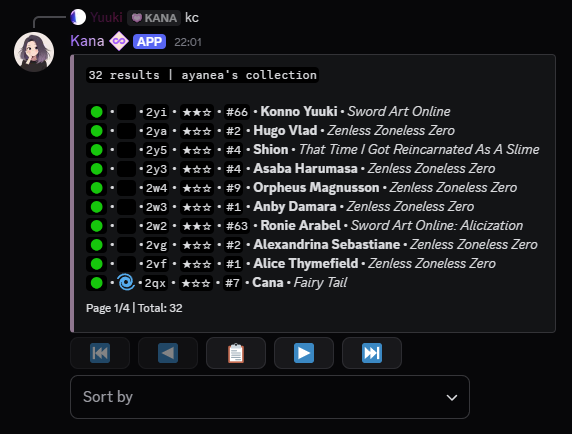
The kcollection [kc] command allows users to view their collection of cards, including various filters to customize the display.
Collections can be paginated, this provides easy navigation. Additionally, built-in sorting options can be accessed through the select menu for easy of use.
Usage
- Command:
kcollection - Alias: [
kc] - Parameters:
- (Optional)
<user>- View another user's collection by mentioning them or using their user ID.
- (Optional)
note
Only registered, unrestricted users with no privacy settings enabled for this command can have their collection viewed.
Filters
- Sorting & Ordering:
- Syntax:
<filter>:<criteria> - Filters:
oororder- Sorting order.
- Criteria:
wl- Order by wishlist.p- Order by print (ascending).ti- Order by tier (descending).
- Example:
o:wl- Sorts the collection by wishlist count.
- Syntax:
- Value Filters:
- Syntax:
<filter>(<, >, =, <=, >=)<number> - Filters:
wlorwishlist- Wishlist count.porprint- Print count.tiortier- Tier [1-3].
- Example:
wl>5- Filters cards with a wishlist count greater than 5.
- Syntax:
- Tag & Character Filters:
- Syntax:
<filter>:<tag> - Filters:
tortag- Filter by card tags.
- Additional values:
none,falseorf- Filter by cards without tagstrue- Filter by cards with tags
- Example:
t:character- Filters cards with the "character" tag.
- Syntax:
- Series Filters:
- Syntax:
<filter>:<series> - Filters:
sorseries- Filter by series name.
- Example:
s:Mythical Creatures- Filters cards from the "Mythical Creatures" series.
- Syntax:
- Morph Filters:
- Syntax:
<filter>:<morph state> - Filters:
mormorph- Filter by morph type.
- States:
trueort- Any morph.none,falseorf- No morph.charorcharacter- Character morph.gloworg- Glow morph.
- Example:
m:character- Filters cards with a character morph.
- Syntax:
- Frame Filters:
- Syntax:
<filter>:<true/false> - Filters:
forframed- Filter based on whether a card is framed.
- Options:
trueort- Has frame.falseorf- No frame.
- Example:
f:true- Filters cards with a frame.
- Syntax:
- Sacrificed filter:
- Syntax:
<filter>:<true/false> - Filters:
sacorsacrificed- Filter by whether a character has been sacrificed.
- Example:
sac:false- Filters cards of characters that have not been sacrificed.
- Syntax:
note
Cards that have been sacrificed are displayed with an empty space in the third slot or the 🌀 emoji.
tip
Combining Filters:
- Syntax:
<filter1> <filter2> - Filters can be combined to refine searches further.
- Example:
t:none wl<10- Returns cards that haven't been tagged and have a wishlist lower than 10