Cooldowns & Reminders
The [p]cooldown [cd, rm] command shows you when your recurring actions are next available and lets you turn reminders on or off for each one.
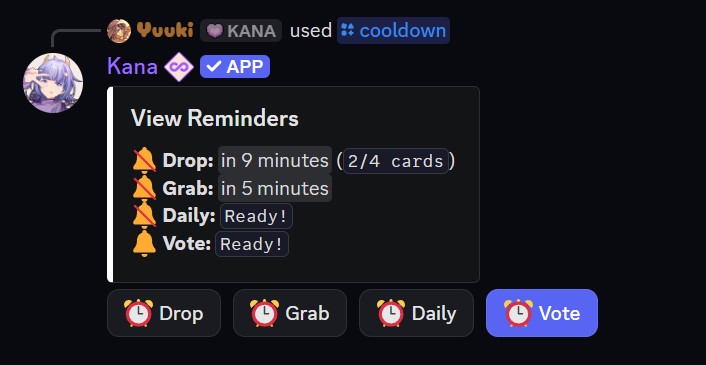
- Command:
[p]cooldown - Alias: [
cd,rm] - Parameters: None
The overview tracks four things:
| Action | Interval |
|---|---|
| Drop | Based on the server drop cooldown |
| Grab | Based on the server grab cooldown |
| Daily | Every 24 hours |
| Vote | Every 12 hours |
Each entry shows either a countdown to when it is ready or a Ready! marker. A bell icon next to an action shows whether its reminder is enabled.
Reminders
Press the button for any action to toggle its reminder on or off. When a reminder is on, Kana notifies you once that action is ready again, so you do not have to keep checking.
Drop, grab, and daily reminders are off by default, so turn on the ones you want. Reminders are sent to your DMs unless you change Reminder Delivery in [p]settings to Channel, in which case Kana pings you in the channel where the cooldown started. The footer of [p]cooldown shows which delivery mode you are using.
Using an extra drop or an extra grab does not reset its reminder, since it does not start a new cooldown.
Your Drop entry also shows how many cards your next drop will contain. See Drops & Grabs for how drop stacking works.
Reminders pair well with voting and daily rewards, which are easy to forget on a 12 or 24 hour cycle.