Drops & Grabs
Dropping
Dropping is the process of randomly selecting a set of cards for users to grab. They expire after one minute. Expired cards can no longer be grabbed.
There are two types:
- User Drops - Manually triggered using the
[p]drop[d] command. - Activity Drops - Automatically triggered by the bot based on server activity.
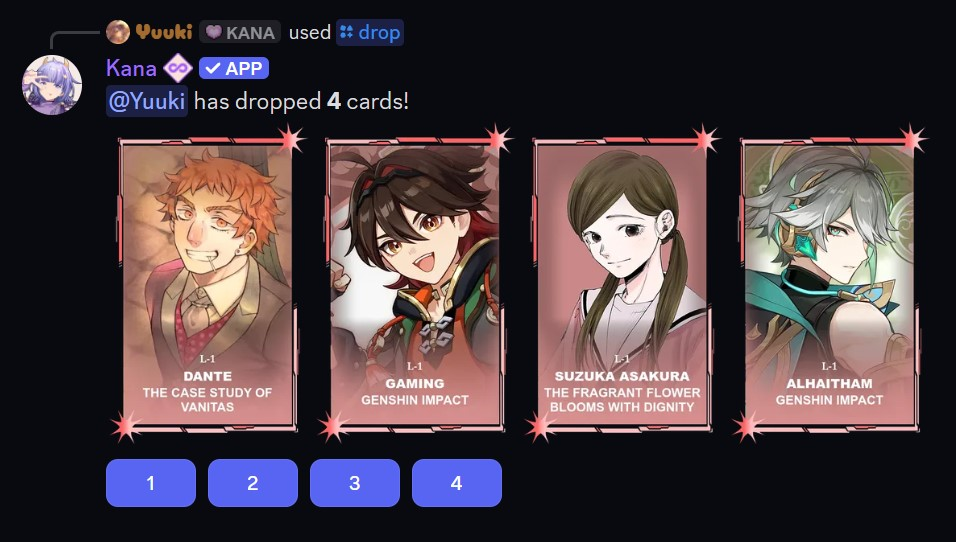
- Command:
[p]drop - Alias: [
d] - Description: Manually initiates a user drop, randomly picks a set of cards for users to grab. Dropped cards expire after one minute.
Print Display
User drops list every card underneath the drop message, showing its slot, print number, wishlist count, character, and series:
1  12 : ╭ 3 ︱Rem • Re:Zero
2 L-7 : ╭ 0 ︱Emilia • Re:Zero
Legacy prints are shown with an L- prefix, and printless cards leave the print column blank. The list stays on the message after the drop expires. The dropper can turn it off with Drop Print Display in [p]settings.
Grabbing
Users can grab a card by selecting the corresponding numbered button. The first card from left to right is assigned to button 1, the second to 2, and so on. When a grab starts, a short anti-snipe timer allows others to join. If the drop author participates, they are guaranteed to win; otherwise, a winner is chosen randomly.

Cooldowns
- User Drops: Every 10 minutes
- Grabs: Every 5 minutes
Drop Stacking
By default, a drop contains 2 cards and is available every 10 minutes. The longer you wait past your drop cooldown, the more cards drop at once:
- Wait twice the cooldown (20 minutes) to drop 3 cards.
- Wait three times the cooldown (30 minutes) to drop 4 cards.
Four is the cap from waiting, though an active boost may occasionally add one more. Holding off on your drop for a while is an easy way to pull more cards at once.
You can see how many cards your next drop will contain, along with your other cooldowns, using the [p]cooldown [cd, rm] command. See Cooldowns & Reminders for more.
Normal vs. Extra Drops & Grabs
There are two types of drops and grabs:
- Normal: Free to use but has a cooldown.
- Extra: Uses special items (extra drops and extra grabs) to bypass cooldowns.
Extra drops and grabs can be purchased from the item shop using the [p]itemshop [is] command. They can be bought with [p]buy grab <amount> or [p]buy drop <amount>. If a user attempts to drop or grab while on cooldown and has an extra item, it will be automatically used.